Professional programmes in:

Music Production | Sound Engineering | Music Education | Dance | Theatre

Mastering for Different Platforms: Techniques for Spotify, Apple Music, and More

Music streaming is the ‘de-facto’ way most listeners consume music these days, and there are several platforms that your fanbase could be using to get their music. Publishing your work to as many platforms as possible will surely help you maximise reach, but is it enough to just upload the same audio file to each of these platforms? The short answer is ‘No’.


Understanding the way that popular streaming platforms such as Spotify, Apple Music, Gaana, JioSaavn, and so on, process and playback audio will help you or your mastering/sound engineer get the most out of your final mix. To help you out, we’ve put together this short guide explaining techniques that will ensure your music sounds its best, no matter where it’s played.

Understanding Loudness, LUFS, and Normalization Across Platforms

One of the most critical aspects of mastering for streaming platforms is understanding loudness, LUFS (Loudness Units Full Scale), and normalization. Each platform uses loudness normalization to ensure a consistent listening experience for its users. This means that tracks mastered too loud will be turned down, while quieter tracks might be turned up, but only within the limits set by the platform’s normalization standards.

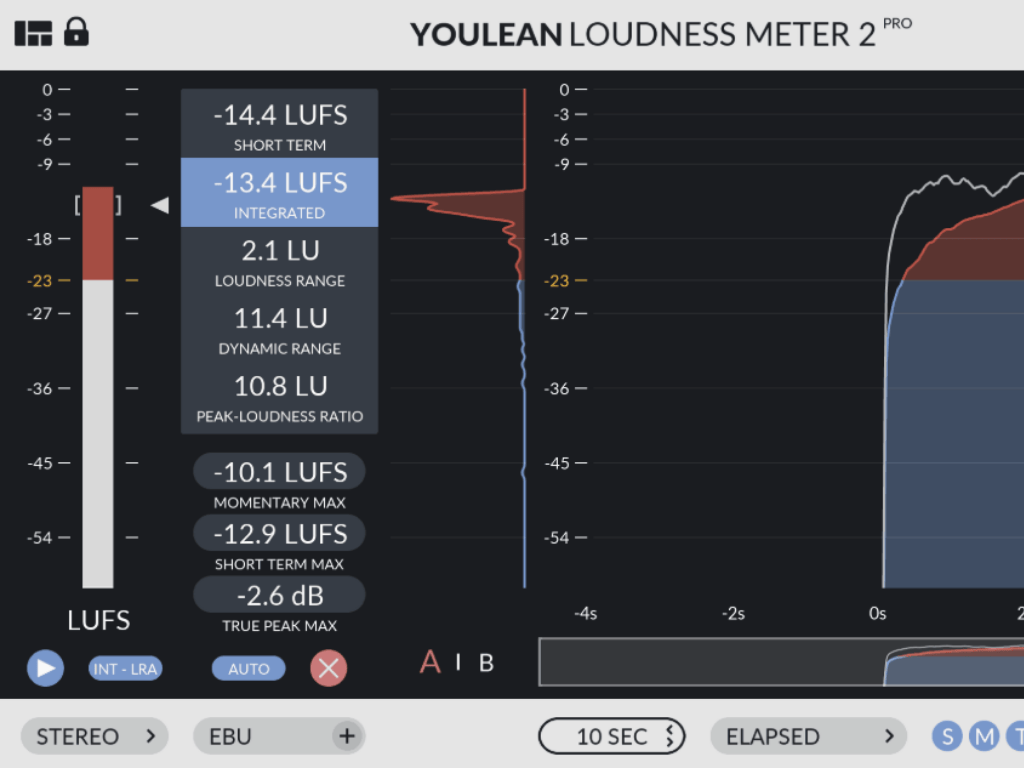
LUFS is a standardized unit for measuring loudness, taking into account the human ear’s sensitivity to different frequencies. Unlike traditional peak meters, which only measure the loudest parts of a track, LUFS meters consider the overall perceived loudness, giving a more accurate representation of how loud a track will sound to listeners. This is crucial to consider as both a music producer or engineer because music streaming platforms like Spotify and Apple Music use LUFS as the basis for their loudness normalization.

Normalization adjusts the playback volume of a track to match a predetermined loudness level, typically measured in ‘LUFS’. For instance, if your track is louder than Spotify’s target of -14 LUFS, the platform will turn it down during playback. Conversely, if it’s quieter, Spotify might increase its volume, but only as much as the track’s peak levels allow without introducing distortion. Understanding how each platform applies normalization is essential for mastering, as it directly affects how your music will sound to the end listener.

Mastering Your Tracks for Spotify and Apple Music

A) Mastering For Spotify: 

To master your tracks for Spotify playback, consider the following:

1) Loudness Optimisation

Target a final output loudness of around -14 LUFS. Spotify uses this standard to ensure that tracks within a playlist or album playback at a consistent volume so ensure you don’t deviate too much to avoid affecting your track’s dynamic range on the platform.

Some artists may master at -11 LUFS for a louder playback or -19 LUFS for quieter levels. This, ultimately, is a subjective decision that will depend on your track’s dynamics and creative vision, although we recommend not to master beyond this range to avoid excess changes to your overall sound.

2) Platform Limiting & Compression
Spotify uses the Ogg Vorbis codec, which compresses audio data to save bandwidth without sacrificing too much quality. This compression can introduce artifacts, especially in the higher frequencies, so it’s common practice to set your track’s True Peak level to -1 dBTP (dB True Peak) or lower, ensuring that the encoded file doesn’t clip or distort.


 B) Mastering For Apple Music:

Mastering your tracks for Apple Music differs slightly from Spotify:

1) Loudness Optimisation
Apple Music uses a normalization target of -16 LUFS, which is slightly quieter than Spotify. This allows for more dynamic range, which is particularly beneficial for genres that require more subtlety and detail. Maintaining your output volume around this range will ensure your track’s dynamics remain intact.


2) Platform Limiting  & Compression

The platform uses the AAC codec, known for its efficient compression and high-quality audio reproduction. Unlike Spotify, Apple Music does not apply limiting during playback, meaning that tracks retain their original dynamics more closely. For Apple Music, maintaining a True Peak limit of -0.3 dBTP is often sufficient to prevent distortion in the AAC codec.

Adapting to Other Platforms: Tidal, YouTube Music, and More

There are a plethora of music streaming services aside from Spotify & Apple Music that you may want to consider mastering for separately. While examining the compression & optimisation characteristics for every platform in depth is beyond the scope of this blog, we’d thought we’d share some tips to get you started:

Tidal: 

Known for its lossless streaming, Tidal prioritizes high-fidelity audio. When mastering for Tidal, ensure that your track has a high dynamic range and minimal distortion. Unlike other platforms, Tidal’s focus on lossless audio means that any flaws in your master will be more noticeable, so it’s important to maintain the highest quality possible.

YouTube Music:

YouTube Music uses a lower bit rate for its audio streams, which can introduce more compression artifacts. When mastering for YouTube Music, consider applying slightly more compression to maintain clarity and prevent muddiness, especially in the low and high frequencies.

Amazon Music and Deezer: 

Both platforms use a -14 LUFS normalization target, similar to Spotify. However, their codecs and playback environments may differ slightly, so it’s essential to test your master on these platforms if possible to ensure consistent playback quality.

Conclusion: The Challenge of Creating a Universal Master

With so many different music streaming services available, creating a master that works well on all platforms can be challenging. While it’s ideal to create separate masters tailored to the specific requirements of each platform, this isn’t always practical due to time and budget constraints. In such cases, aiming for a compromise that sounds good across all platforms is probably the best approach. This might mean finding a middle ground in terms of loudness, peak levels, and dynamic range that maintains track quality regardless of where it’s played.

You may want to consider using software like iZotope’s ‘Streaming Preview’ to test how your tracks will sound after streaming platforms process them. The tool simulates the encoding and normalization process that streaming services use, giving you a clearer idea of how your track will be heard by listeners. Mastering tools such as Dynamic EQ & Multiband Compression are also good tools to help fine-tune dynamic range & loudness for your final output.

Mastering for music streaming platforms is an ever-evolving challenge. As the industry continues to grow and new platforms emerge, staying informed about the latest standards and best practices is essential for any mastering engineer. By understanding the different music streaming services available to you and the differences between how they process & playback audio Spotify, you can create masters that translate well for listeners across the board.

“Want to master music publishing & create the perfect mix for your musical work? We can help! Visit our Music Production program page or speak with our advisors to learn how you can support your career growth through structured & career-oriented education.”


Discover more from Learn Music Production, Sound Engineering, Dance & Theatre courses in Goa | Apply Now at Future School of Performing Arts

Subscribe to get the latest posts sent to your email.

Chat with an Advisor